A UFO drawn in the GIMP

I’ve been playing around with the GIMP recently, drawing stuff, rather than editing or touching up photos. I decided to try to draw a small UFO, and the following post shows how I did it. There’s almost certainly better ways to do it, but I’m no Gimp guru!

[For those who don’t know, the GIMP is a free image processing program available for Windows, Linux and Mac, which has similar abilities to Adobe Photoshop.]

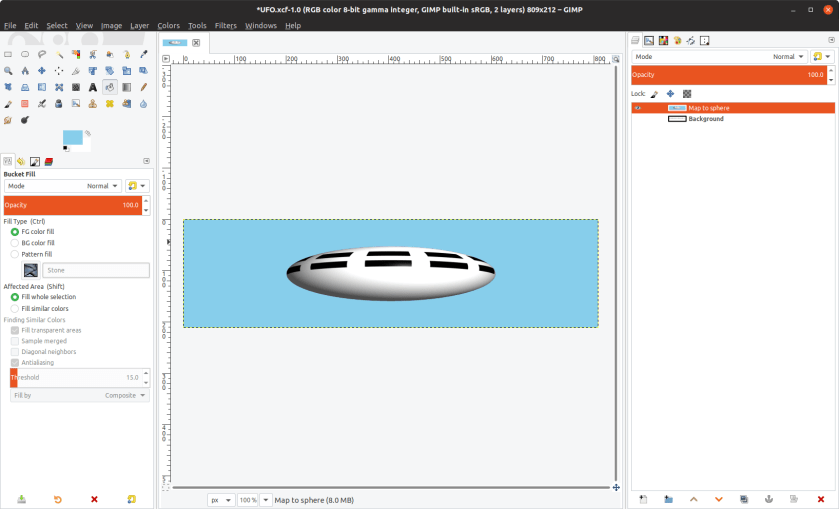
My main idea was to create the UFO as a rectangular image, and then to use the “Map Object” filter that comes with the GIMP to wrap this image around a sphere. So, first I created a rectangular image, four to five times as wide as it was high.

I wanted to have two chains of windows encircling the UFO, so the next step was to create a small layer for a single window. There are many ways to create a new layer, and I’m not going to go into details of all the methods. Please read the Gimp documentation if you want to know more.

One way is to open the Layers dialog either through the “Windows” menu or simply by hitting Ctrl + L, and using the small button at the bottom to create the new layer. I recommend right clicking the new Layer and giving it a name through the “Edit Layer Attributes…” option.

Anyway, having created a new layer, I selected a small rectangular area on it, and filled it with the foreground colour, black, then I used the “Select” menu “Grow…” option to grow it by 10 pixels all round. Here’s what I had at this stage. Note the Layers dialog on the right. I always keep the Layers dialog open as it is so useful!

OK, that’s a little hard to read, I know. The important bit is the bit in the middle, the black square surrounded by a white border, the current selection. I selected “Crop to Selection” on the Layer menu to shrink the Layer to the smallest size needed.

The next stage was to create more window layers with a window in each, so I just clicked the small copy button in the middle of the bottom of the Layers dialog about ten times, with no visible change to the image. This is because all the new layers get created right on top of one another! However, all the layers are listed in the Layers dialog on the right of the screen.

I then used the Move tool to move the new layers to different positions on the screen. I made sure that I’d spread them all out. See below.
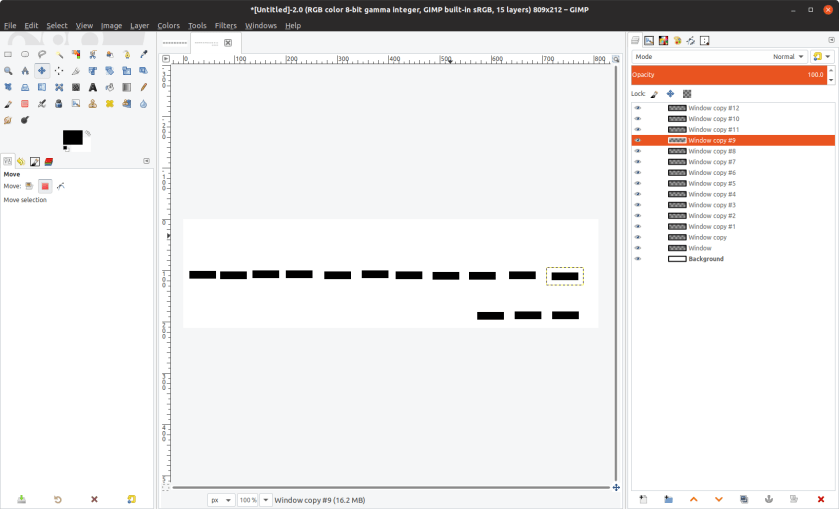
As you can see, they are not exactly aligned and spaced, so that was my next task, using the alignment tool. I wanted this middle row to to be evenly spread along the mid line of the image, so in the alignment tool properties dialog I selected “Relative to     Active layer”. Then I selected all the layers on the middle line, and finally selected the Background layer. I selected the button to align the layers on the mid line of the image (the lower middle of the six buttons in the “Align” section) then I selected the button to distribute the layers evenly across the image (the one on the right of the first row of the “Distribution” section). Now the image looked like this :
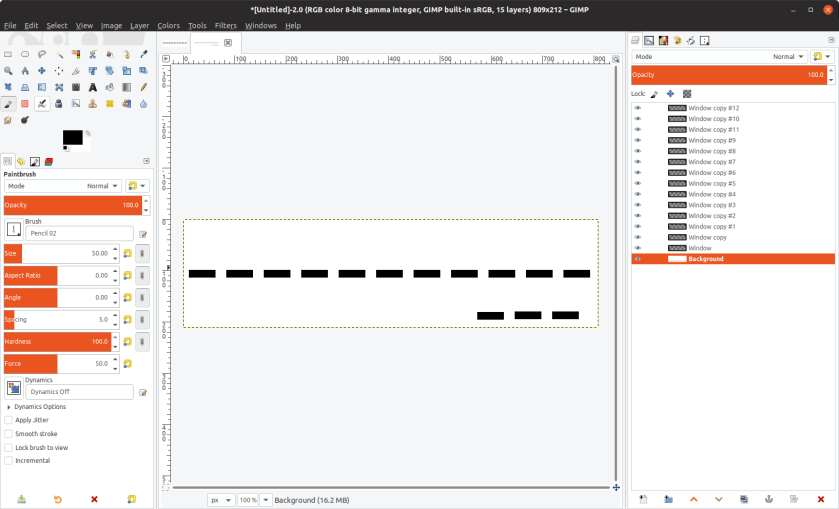
So now I needed to make the second line of windows, just about the first line. So I created a further eight windows by repeatedly copying one of the lower windows, then I spread them out slightly above the other line.

Then using the alignment tool, I selected all the windows in the new line. I changed the “Relative to” value using the drop down menu to “First Item”, then aligned the windows to the first one by using the middle button in the second row of the “Align” section. The reason I aligned the windows to the first window rather than active layer is because otherwise the windows would simply overlay the first set.

Now I needed to space out the windows, so, leaving them selected, I changed the “Relative to” value back to “Active Layer”, then used the right most button on the first row of the “Distribute” section to spread the windows evenly along the line. They now matched the first line, as shown below.

At this stage I saved the image to disk, in case of accidents. The GIMP lets you undo the steps that you have taken in editing or creating an image, but sometimes (especially if you are experimenting), it is useful be able to abandon all your fiddling and start again from a known good image. However, saving an image means that you can’t backtrack from that version of the image.

Now I needed to apply the filter, but the filter appears to only work on a single layer of an image, so I flattened the image to a single layer (using the Image menu), and applied the Map Object filter to the resulting image (Filter->Map->Map Object…). I changed the lighting to make it appear that the lighting was coming from above and to the right and I also adjusted the orientation a little so that viewpoint was slightly below the UFO, as if it was flying overhead. These are options in the filter. I clicked OK and got the following result.
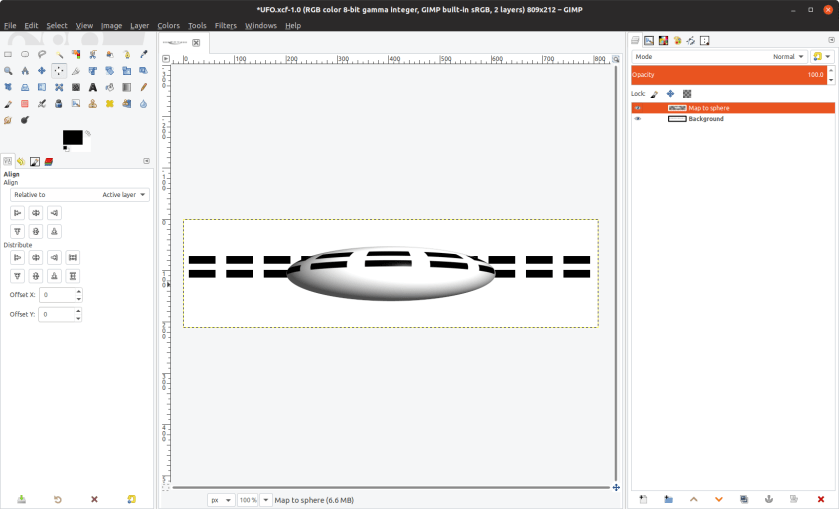
And that is it. It’s a simple enough image, but good enough for my purposes, and it shows a number of simple GIMP techniques. To create the image at the top of the post I merely hid the background layer and filled the areas around the UFO with sky blue. I hope that this post will be useful to someone.  Obviously there is a lot of scope to improve the image, perhaps by adding doors to the lower part, landing legs and so on, but it will do me for now.

Acknowledgement : Much of the stuff on the usage of the Alignment Tool was gleaned from this article. Many thanks to the author, Debi Dallo.

Please read my books. The paperback versions can be found Amazon, and the eBooks can be found there or at your favourite eBook store. I mainly write fantasy fiction.

My Books in eBook form, half price.

OLYMPUS DIGITAL CAMERA

I publish my eBooks through Smashwords and Amazon, so that I get the highest visibility for them. Smashwords has a “New Year” promotion, starting Christmas Day and extending through to New Years Day. During this period, my eBooks will be available through Smashwords at half price.

My paperback versions of “The Last Beautiful Woman” and “The Mage and The Boffin” parts one and two are available on Amazon only.

The Mage and The Boffin in paperback

I’ve published some of Mage and Boffin stories in paperback on Amazon. I discovered that if I’d included them all, the paperback would be too long, so this is the first of two parts! The second part might make it onto Amazon by Christmas, but failing that, watch for an update in the New Year!

The details are as follows:

The Mage and the Boffin – Part One: The Early Stories (Paperback)
ASIN : 0473461900
Link : https://www.amazon.com/gp/product/0473461900


My Books on Amazon

I’ve found that it is not easy to find my books Amazon. Simply searching for my name as author might find them, and it might not. Below I’ve listed my books and the Amazon ASIN numbers. I’ve also included a direct link to my books using the ASIN numbers.

[Update: My books on Amazon can be found a lot easier on my Author’s Page.]

If you use the links below and still have problems please leave me feedback and I will see what I can do to advise you. In particular, you may get a message like this : “This title is not currently available for purchase”. The message may be caused by technical issues at http://www.amazon.com.

The Last Beautiful Woman (Kindle)
ASIN : B07G6V3YZS
Link : https://www.amazon.com/gp/product/B07G6V3YZS

The Last Beautiful Woman (Paperback)
ASIN : 0473448858
Link : https://www.amazon.com/gp/product/0473448858

How I Wrote and Self Published My First Book (Kindle)
ASIN : B07GB6GZ3N
Link : https://www.amazon.com/gp/product/B07GB6GZ3N

The Mage and The Boffin (Kindle)
ASIN : B07JLG1YV5
Link : https://www.amazon.com/gp/product/B07JLG1YV5


A new book and an update

I’ve just published my latest book, “The Mage and The Boffin”. It can be found at your favourite eBook publisher. Just search for my name, “Cliff Pratt” and it should appear in the list.

It is a book of short stories featuring the two title characters and their friends and relations. Some of the stories relate in some degree to fairy stories and legends, but they are not simple retelling of the stories and are significantly different from them.

I have also updated my brief book, “How I Wrote and Self Published My First Book: My Path Through the Creative Maze”. This describes in some detail how I published “The Last Beautiful Woman” and why, and may be useful to anyone who is going down the same path. This is only available on Amazon as a Kindle book. If you don’t have a Kindle you will need a Kindle app.

A New Book – the Mage and the Boffin

I intend to publish a new book in the next couple of weeks. It will consist of short stories about my characters the Mage and the Boffin. I still have to write a prologue and tidy a few things up. If you want to read the stories (for free, at least for now), you can find them on my website here.

Currently I intend to publish the book as an eBook, but may also make it available as a paperback on Amazon. Watch this space!

In the meantime, I have added a new Mage and Boffin story called “The Man in the Mountain“. It tells of the last few days of the life of King Arthur, from the point of view of the Mage and the Boffin.

A New Mage and Boffin Story – Mouse and Moth

I’ve added a new Mage and Boffin story. This one has their great grandson, Mouse, aged 18, as the main actor, though the Mage and Boffin are heavily involved. Mouse meets a girl in the woods – a very special girl. He is headed for love, loss, and a picnic!

Here’s the link to the page for the new story.

Please take a look at my self-published book, “The Last Beautiful Woman”. Here’s the link to the book’s information page.

“The Last Beautiful Woman” publication details

I have published my novel, “The Last Beautiful Woman” in paperback and several electronic versions. Please take a look and see if you like it. The details are below.

  • Firstly, the paperback version. This is to be found on Amazon here. The link refers to the American Amazon site and your local Amazon site may also have the book. Please search for my name, “Cliff Pratt”, and ensure that you have selected the paperback version if that is the one that you want.
  • Secondly, the Kindle eBook version, which can be read on Kindle devices or through an app on Android and Apple platforms. This can be found on the Amazon Kindle Store here. Once again it may be available on your local Kindle site. Search for my name.
  • Thirdly, it is available as an eBook on Kobo here. The Kobo eReader app is available for Android and for Apple devices, and there is also a Kobo app for Windows and Mac desktops, but unfortunately, not one for Linux desktops. There are Linux eReader apps which will read many eBook types and you may find one which will read Kobo eBooks, which are simply ePub format.
  • Fourthly and finally, I have uploaded my novel to SmashWords. As well as the eBook being available on the SmashWords site itself, SmashWords distributes uploaded eBooks to several other bookshop sites as well. At SmashWords eBooks are available in several formats, including PDF. You should be able to find one in a format that suits you there!

Here’s the ‘teaser’ for the book. Please take a look!

What is it like to live at least three times as long as the average human? Jenna has just passed her one hundred and fiftieth birthday and looks to be just over thirty, and she is, so far as she knows, unique. She lives in isolation from the rest of the human race in an inaccessible and protected location known simply as “her home”.

Although she is physically isolated, she still communicates extensively with other people. She has a few loyal staff in her retreat, and a number of others around the world. She has enormous global influence and talks to the leaders of the nations and other powerful people around the world by videoconference and videophone almost every day.

She is reconsidering the reasons for her isolation, and wonders whether those reasons still apply. How did she come to be living in isolation. Is it time for the isolation to end?

She sees in an article by a newspaper reporter an indication that, perhaps, her affect on society has not been completely positive. She decides to ask the newspaper reporter to visit her to discuss his views, but she underestimates the effect of this break in one hundred years of tradition. George, the reporter, and his friends are sucked into a whirlwind of global interest.

Their lives will never be the same again.

Boffin and Mage Stories

I’ve mostly being working on a longer story which I’m not yet ready to post, so I’ve not been adding Mage and Boffin stories recently, but I’ve now got three new stories to add. Please see below. If you are interested in my other writing, it can all be found here.

Cloud Skiing – The Mage enjoys a day cloud skiing while the heavily pregnant Boffin relaxes at the lodge.

Mouse’s Friend – The Mage and Boffin’s great-grandson Mouse makes a friend called Jasper, who leads Mouse and the Mage to a very hot place.

Twins – Two bear cubs surprise a set of twin girls. They help the girls and their mother with a couple of issues with their neighbour. The Mage and the Boffin take a trip to meet the bears and later relax at the lake.


Three new Boffin and Mage stories

Here are three new short stories in the Mage and Boffin series. I hope you enjoy them. The stories are as follows:

Sea Dragons – The dragons ask the Boffin and the Mage for help again, but these dragons don’t fly. They swim! The Boffin and the Mage also acquire some helpers.

Water, As Far As The Eye Can See – The Boffin has an accident and loses her memory. The Mage has to search for her. Clever little Mouse knows where his Great Gran is!

Selene Base – The Boffin goes to the Moon the hard way, while the Mage manages the communications.

All my stories can be found here.