Virtual Reality


Embed from Getty Images

Back in 1999 I was just finishing my Masters degree at Victoria University of Wellington. I needed a subject for my research paper and I chose what was then a hot topic, Virtual Reality (VR). At the time, the computing resources that were available to most people were, by today’s standards pretty limited.

17 years ago we measured RAM in megabytes, and disk space in gigabytes. The Internet was not as pervasive as it is today, and most people, if they accessed the Internet at all, used dial up modems. Broadband was for most people, still in their future. As were smartphones and all the technology that we immerse ourselves in today.

Exploded view of a personal computer
Exploded view of a personal computer (Photo credit: Wikipedia)

As could be imagined, this limited the effectiveness of VR. If you were trying to set up a VR session between two geographically separated places, then the VR experience could be somewhat limited by the low resolution, the speed of updates of the views that the users experienced, and the lags caused by the (relatively) slow connections.

Nevertheless, research was taking place, and Head Mounted Displays (HMDs) and VR gloves were researched and developed. The HMDs provided the user with displays of the virtual world around him/her, and the gloves provided the tactile element to some extent.

English: zSight HMD by Sensics, Inc.
English: zSight HMD by Sensics, Inc. (Photo credit: Wikipedia)

These devices have their current descendants of course, though more is heard of the HMDs than the gloves. The HMDs range from the highly developed devices like the Oculus Rift right down to cheap devices like Google Cardboard which literally that, a head mounted device consisting of a cardboard body and a cellphone. The cellphone’s screen is divided into two and different images are provided to each eye for the 3-Dimensional effect.

It was evident, back in 1999 when I wrote my paper that VR was a technology looking for an application, and it still is. Some TVs have been made which incorporate 3D technology, but the production of these appears to have tailed off almost completely. Apparently the added ability to experience movies in 3D which involved wearing special headsets, wasn’t enough to offset the necessity to wear the headsets.


Embed from Getty Images

People just used their imaginations when immersed in a program or movie and didn’t feel that they needed the extra dimension, and the headset added a barrier which prevented experience of shared movie watching that forms at least part of the entertainment value of watching movies with friends and families.

My paper was about diffusion of VR techniques into everyday life, and it mostly missed the point I think in retrospect (though the paper did help me get the degree!)  My paper used a Delphi Technique for the research. This technique involves posing a series of question on the research topic to a number of specialists in the field. Their answers are then summarised and passed back to the whole panel. Any subsequent comments are then also summarised.

English: Temple of Apollo in Delphi
English: Temple of Apollo in Delphi (Photo credit: Wikipedia)

Obviously as workers in the field my panel was positive about VR’s then prospects, as you would expect. They however did sounds some notes of caution, which proved to be well founded. I’m not going to do a critique of my paper and the panel’s findings, but I will touch on them.

Specifically, they mentioned that my questions were all about fully immersive VR, which is basically what I’ve been talking about above, the HMD thing. Augmented VR, where our view of the world in not (fully) obstructed by the technology, but the technology enhances our view of the world is used much more in practise, and was when I wrote my paper too.

Augmented reality - heads up display concept
Augmented reality – heads up display concept (Photo credit: Wikipedia)

Augmented VR is things like Head Up Displays (HUDs) and Google Glass where information is added to the user’s field of view, providing him/her with extra information about the world around him/her is much more common. HUDs are common in planes and the like where the operator cannot spare the time to go and look up important information so the information is projected into his field of view. Google Glass was similar but allowed the user to feed back or request information, but unfortunately this did not really catch on and was dropped.


Embed from Getty Images

I mentioned in my questions to my panel that maybe the speed of the Internet was a barrier to the introduction of VR into everyday life. The panel were mostly sympathetic to this viewpoint, but in summary thought that fibre, which was on the horizon would significantly reduce this barrier to the everyday adoption of VR techniques. In fact people do not use the extra bandwidth for VR (except in a way that I will touch on in a minute), but for other things, like streaming TV shows and downloading music.

English: Screenshot of NcFTP downloading a fil...
English: Screenshot of NcFTP downloading a file Category:Screenshots of Linux software (Photo credit: Wikipedia)

As I envisaged it, a typical VR setup would consist of someone in, say, London, with VR set interacting over the Internet with someone in, say, Tokyo who also has a VR set. They could shake each other’s hand, and view and discuss three dimensional objects in real time, regardless of whether the object was in London or Tokyo. Although I had not considered it at the time, a 3D printer could duplicate a 3D object in the other location, if required.

This has not happened. Teleconferences are stubbornly 2D, and there is no call for a third dimension. Some people, myself included, would not miss the 2D visual aspect at all, would quite happily drop back to voice only!

English: Washington, DC, August, 14, 2007 -- T...
English: Washington, DC, August, 14, 2007 — This FEMA video teleconference with the FEMA regional directors, state Emergency Operations Centers and Federal partners concerns Hurricane Flossie which is expected to pass just south of the island of Hawaii and Tropical Storm Dean which is building in the Atlantic and moving west toward the Caribbean Sea. FEMA’s National Response and Coordination Center (NRCC) is activated at Level 2. FEMA/Bill Koplitz (Photo credit: Wikipedia)

In one respect, though, VR has come and has taken over our lives without us realising. When we interact with our smartphones, texting, sending photos, emails and so on, in real time, we are immersing ourselves in a new sort of VR. When we are chatting about something and someone gets the cellphone out to google the Internet to check or look something up, we are delving into a new Virtual Reality that we could not have envisaged way back in 1999.


Embed from Getty Images

So when I look back at my paper from that era, I could easily update it and make relevant to the current era, but only in the respect of that limited view of VR. That has not really eventuated, and most likely will have limited application (remote appendectomy anyone?), but it could be considered that facebook/twitter/google/gmail/dropbox and all the other tools that we use on our smartphones has opened up a different alternate Virtual Reality that crept up on us while we were not watching.

facebook engancha
facebook engancha (Photo credit: Wikipedia)

Imagine this….

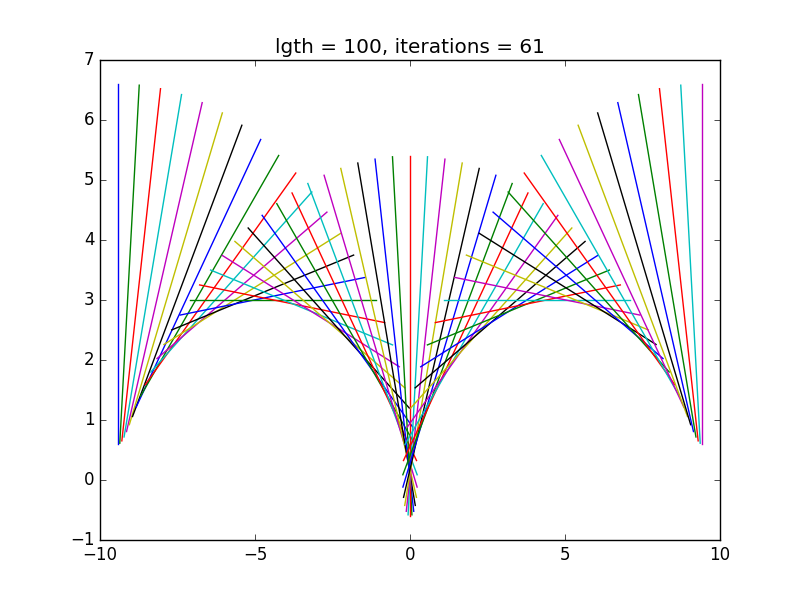
Flying Swan
Drawn using Python and Matplotlib. This picture is serendipitous and not intended.

[Grr! While I finished my previous post, I didn’t publish it. Darn it.]

Since I’ve been playing around with computer generated images recently, my thoughts turned to how we see images. When you look at a computer or television screen these days, you are looking at a matrix of pixels. A pixel can be thought of as a very tiny point of light, or a location that can be switched on and off very rapidly.

Pixels are small. There’s 1920 across my screen at the current resolution, and while I can just about see the individual pixels if I look up close, they are small. To get the same resolution with an array of 5cm light bulbs, the screen would need to be 96 metres in size! You’d probably want to sit at about 150m from the screen to watch it.

A closeup of pixels.
A closeup of pixels. (Photo credit: Wikipedia)

The actual size of a pixel is a complicated matter, and depends on the resolution setting of your screen. However, the rating of a camera sensor is a different matter entirely. When I started looking into this, I thought that I understood it, but I discovered that I didn’t.

What complicates things as regards camera sensor resolutions is that typically a camera will store an image as a JPG/JPEG image file, though some will save the image as a RAW image file. The JPG format is “lossy” so some information is lost in the process (though typically not much). RAW image file are minimally processed from the sensor data so contain as much information about what the sensor sees as is possible. Naturally they are larger than JPG format images.


Embed from Getty Images

When we look at a screen we don’t see an array of dots. We pretty much see a smooth image. If the resolution is low, we might consider the image to be grainy, or fuzzy, but we don’t actually “see” the individual pixels as such, unless we specifically look closely. This is because the brain does a lot of processing of an image before we “see” it.

I’ve used the scare quotes around the word “see”, because seeing is very much a mental process. The brain cells extend right out to the eye, with the nerves from the eye being connected directly into the brain.

Schematic diagram of the human eye in greek.
Schematic diagram of the human eye in greek. (Photo credit: Wikipedia)

The eye, much like a camera, consists of a hole to let in the light, a lens to focus it, and sensor at the back of the eye to capture the image. Apparently the measured resolution of the eye is 576 megapixels, but the eye has a number of tricks to improve its apparent resolution. Firstly, we have two eyes and the slightly different images are used to deduce detail that one eye alone will not resolve. Secondly, the eye moves slightly and this also enables it to deduce more detail than would be apparent otherwise.

That said, the eye is not made of plastic metal and glass. It is essentially a ball of jelly, mostly opaque but with a transparent window in it. The size of the window or pupil is controlled by small muscles which contract or expand the size of the pupil depending on the light level (and other factors, such as excitement).

English: A close up of the human eye. Notice t...
English: A close up of the human eye. Notice the reflection of the photographer. (Photo credit: Wikipedia)

The light is focused on to an area at the back of the eye, which is obviously not flat, but curved. Most the focusing is done by the cornea, the outermost layer of the eye, but the lens is fine tuned by muscles which stretch and relax the lens as necessary. This doesn’t on the face of it seem as accurate as a mechanical focusing system.

In addition to these factors, human eyes are prone to various issues where the eye cannot focus properly, such as myopia (short sightedness) or hyperopia (long sightedness) and similar issues. In addition the jelly that forms the bulk of the eye is not completely transparent, with “floaters” obstructing vision. Cataracts may cloud the front of the cornea, blurring vision.

English: Artist's impression of appearance of ...
English: Artist’s impression of appearance of ocular floaters. (Photo credit: Wikipedia)

When all this is considered, it’s amazing that our vision works as well as it does. One of the reasons that it does so well is, as I mentioned above, the amazing processing that our brains. Interestingly, what it works with is the rods and cones at the back of the eye, which may or may not be excited by light falling on them. This in not exactly digital data, since the associated nerve cells may react when the state of the receptor changes, but it is close.

It is unclear how images are stored in the brain as memories. One thing is for sure, and that is that it is not possible to dissect the brain and locate the image anywhere in the brain. Instead an image is stored, as it is in a computer, as a pattern. I suspect that the location of the pattern may be variable, just as a file in a computer may move as files are moved about.

Expanded version, with explanations.
Expanded version, with explanations. (Photo credit: Wikipedia)

The mind processes images after the raw data is captured by the eye and any gaps (caused by, for example, blood vessels in the eye blocking the light). This is why, most of the time, we don’t notice floaters, as the mind edits them out. The mind also uses the little movements of the eye to refine information that the mind uses to present the image to our “mind’s eye“. The two eyes, and the difference between the images on the backs of them also helps to build up the image.

It seems likely to me that memories that come in the form of images are not raw images, but are memories of the image that appears in the mind’s eye. If it were otherwise the image would lacking the edits that are applied to the raw images. If I think of an image that I remember, I find that it is embedded in a narrative.

Narrative frieze.
Narrative frieze. (Photo credit: Wikipedia)

That is, it doesn’t just appear, but appears in a context. For instance, if I recall an image of a particular horse race, I remember it as a radio or television commentary on the race. Obviously, I don’t know if others remember images in a similar way, but I suspect that images stored in the brain are not stored in isolation, like computer files, but as part of a narrative. That narrative may or may not relate to the occasion when the image was acquired. Indeed the narrative may be a total fiction and probably exists so that the mental image may be easily retrieved.

One bubble memory track and loop
One bubble memory track and loop (Photo credit: Wikipedia)


The Banach Tarski Theorem


Embed from Getty Images

There’s a mathematical theorem (the Banach Tarski theorem) which states that

Given a solid ball in 3‑dimensional space, there exists a decomposition of the ball into a finite number of disjoint subsets, which can then be put back together in a different way to yield two identical copies of the original ball.

This is, to say the least, counter intuitive! It suggests that you can dissect a beach ball, put the parts back together and get two beach balls for the price of one.

This brings up the question of what mathematics really is, and how it is related to what we loosely call reality? Scientists use mathematics to describe the world, and indeed some aspects of reality, such as relativity or quantum mechanics, can only be accurately described in mathematics.


Embed from Getty Images

So we know that there is a relationship of some sort between mathematics and reality as our maths is the best tool that we have found to talk about scientific things in an accurate way. Just how close this relationship is has been discussed by philosophers and scientists for millennia. The Greek philosophers, Aristotle, Plato, Socrates and others, reputedly thought that “all phenomena in the universe can be reduced to whole numbers and their ratios“.

The Banach Tarski theorem seems to go against all sense. It seems to be an example of getting something for nothing, and appears to contravene the restrictions of the first law of thermodynamics. The volume (and hence the amount of matter) appears to have doubled, and hence the amount of energy contain as matter in the balls appears to have doubled. It does not appear that the matter in the resulting balls is more attenuated than that in the original ball.

The Banach–Tarski paradox: A ball can be decom...
The Banach–Tarski paradox: A ball can be decomposed and reassembled into two balls the same size as the original. (Photo credit: Wikipedia)

Since the result appears to be counter intuitive, the question is raised as to whether or not it is merely a mathematical curiosity or whether it has any basis in reality, It asks something fundamental about the relationship between maths and reality.

It’s not the first time that such questions have been asked. When the existence of the irrational numbers was demonstrated, Greek mathematicians were horrified, and the discoverer of the proof (Hippasus) was either killed or exiled, depending on the source quoted. This was because the early mathematicians believed that everything could be reduced to integers and rational numbers, and their world did not have room for irrational numbers in it. In their minds numbers directly related to reality and reality was rational mathematically and in actuality.

English: Dedekind cut defining √2. Created usi...
English: Dedekind cut defining √2. Created using Inkscape. (Photo credit: Wikipedia)

These days we are used to irrational numbers and we see where they fit into the scheme of things. We know that there are many more irrational numbers than rational numbers and that the ‘real’ numbers (the rational and irrational numbers together) can be described by points on a line.

Interestingly we don’t, when do an experiment, use real numbers, because to specify a real number we would have write down an infinite sequence of digits. Instead we approximate the values we read from our meters and gauges with an appropriate rational number. We measure 1.2A for example, where the value 1.2 which equals 12/10 stands in for the real number that corresponds to the actual current flowing.

English: A vintage ampere meter. Français : Un...
English: A vintage ampere meter. Français : Un Ampèremètre à l’ancienne. (Photo credit: Wikipedia)

We then plug this value into our equations, and out pops an answer. Or we plot the values on a graph read off the approximate answer. The equations may have constants which we can only express as rational numbers (that is, we approximate them) so our experimental physics can only ever be approximate.

It’s a wonder that we can get useful results at all, what with the approximation of experimental results, the approximated constants in our equations and the approximated results we get. If we plot our results the graph line will have a certain thickness, of a pencil line or a set of pixels. The best we can do is estimate error bounds on our experimental results, and the constants in our equations, and hence the error bounds in our results. We will probably statistically estimate the confidence that the results show what we believe they show through this miasma of approximations.

Image of simulated dead pixels. Made with Macr...
Image of simulated dead pixels. Made with Macromedia Fireworks. (Photo credit: Wikipedia)

It’s surprising in some ways what we know about the world. We may measure the diameter of a circle somewhat inaccurately, we multiply it by an approximation to the irrational number pi, and we know that the answer we get will be close to the measured circumference of the circle.

It seems that our world resembles the theoretical world only approximately. The theoretical world has perfect circles, with well-defined diameters and circumference, exactly related by an irrational number. The real world has shapes that are more or less circular, with more or less accurately measured diameters and circumferences, related more or less accurately by an rational number approximating the irrational number, pi.

Pi Animation Example
Pi Animation Example (Photo credit: Wikipedia)

We seem to be very much like the residents of Plato’s Cave and we can only see a shadow of reality, and indeed we can only measure the shadows on the walls of the cave. In spite of this, we apparently can reason pretty well what the real world is like.

Our mathematical ruminations seem to be reflected in reality, even if at the time they seem bizarre. The number pi has been known for so long that it no longer seems strange to us. Real numbers have also been known for millennia and don’t appear to us to be strange, though people don’t seem to realise that when they measure a real number they can only state it as a rational number, like 1.234.

English: The School of Athens (detail). Fresco...
English: The School of Athens (detail). Fresco, Stanza della Segnatura, Palazzi Pontifici, Vatican. (Photo credit: Wikipedia)

For the Greeks, the irrational numbers which actually comprise almost all of the real numbers, were bizarre. For us, they don’t seem strange. It may be that in some way, as yet unknown, the Banach Tarski theorem will not seem strange, and may seem obvious.

It may be that we will use it, but approximately, much as we use the real numbers in our calculations and theories, but only approximately. I doubt that we will be duplicating beach balls, or dissecting a pea and reconstituting it the same size as the sun, but I’m pretty sure that we will be using it for something.


Embed from Getty Images

I see maths as descriptive. It describes the ideal world, it describes the shape of it. I don’t think that the world IS mathematics in the Pythagorean sense, but numbers are an aspect of the real world, and as such can’t help but describe the real world exactly, while we can only measure it approximately. But that’s a very circular description.

English: Illustrates the relationship of a cir...
English: Illustrates the relationship of a circle’s diameter to its circumference. (Photo credit: Wikipedia)


Turtles and More

Kina
Turtle graphics. This to me resembles a Kina or Sea Urchin

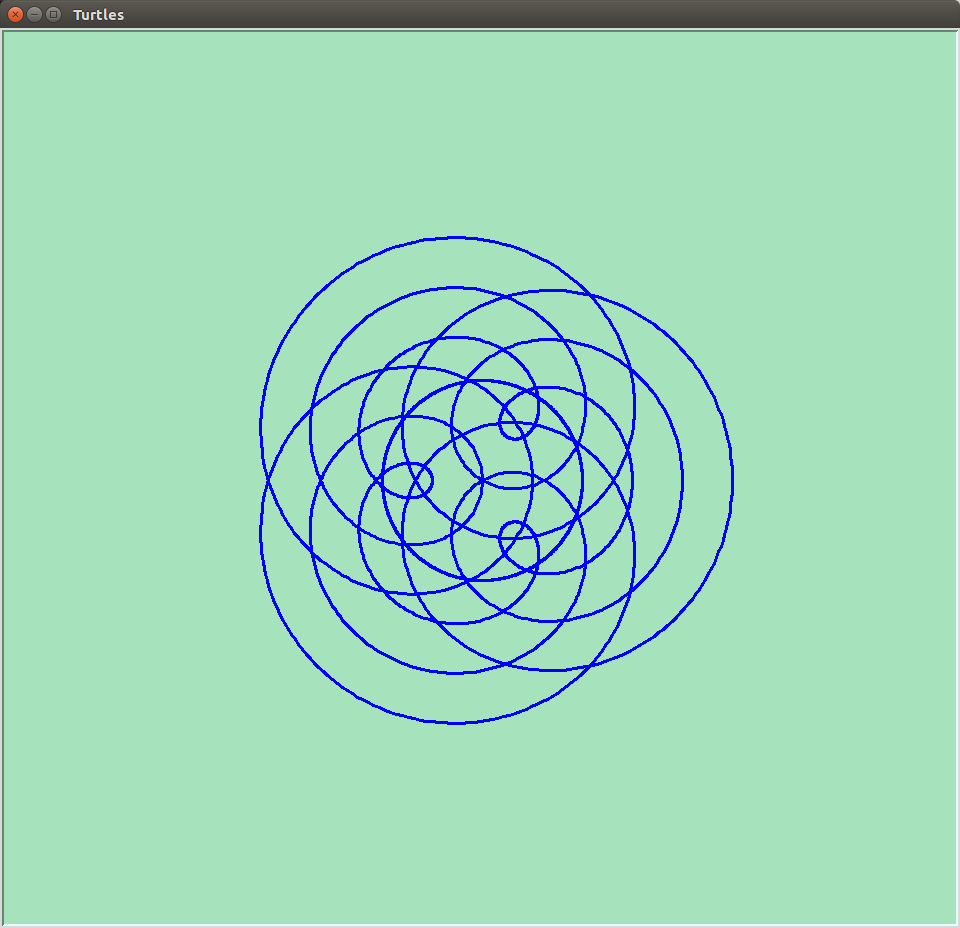
My wife recently became interested in the Spirograph (™) system. Since her birthday was coming up, so did I, for obvious reasons. If you have never come across Spirograph (™) I can highly recommend it, as it enables the production of glorious swirls and spirals, using a system of toothed wheels and other shapes. When you use multicoloured pen, the results can be amazing.

Of course, I had to translate this interest into the computer sphere, and I immediately recalled “Turtle Graphics” which I have used before. It is possible to create graphics very similar to the Spirograph (™) designs very simply with Turtle Graphics.

Trefoil
This resembles the sort of things generated by Spirograph (TM)

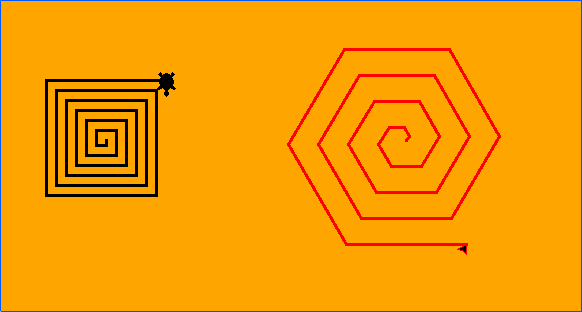
Turtle Graphics have a long history, stretching back at least to the educational programming language Logo. Although variations of the original Logo language exist, they are fairly rare, but the concept of Turtle Graphics, where a cursor (sometimes shown as the image of a cartoon turtle) draws a line on a page, still exists. The turtle can be directed to move in a particular way, based on instructions by the programmer.

For instance the turtle can be instructed to move forward a certain distance, turn right through 90°, and repeat this process three times. The result is a small square. Or the turtle could be instructed to move forward and turn only 60°, repeating this 5 times to draw a hexagon. Using simple instructions like this allow the drawing of practically anything.

Square and Hexagonal spirals
Square and hexagonal spirals drawn by Turtle Graphics

I use an implementation of Turtle Graphics in the turtle module of the Python programming language but it is probably available for other programming languages. Python is probably an easy language to learn from scratch than Logo, and in addition Python can be used for many other things than Turtle Graphics. Python is available for Windows, OS/X, and Linux/Unix, and for several other older or less well known platforms.

Where things become interesting is when the looping abilities of Python are used to enhance a program. If the programmer gets the turtle to draw a square, then makes the turtle turn a little and repeats the process, the result is a circular pattern. Starting with a more interesting shape can produce some interesting patterns.

Rotated Square - Turtle graphics
Rotated Square – Turtle graphics

After a while, though, the patterns begin to seem very similar to one another. One way to add a bit of variation is to use the ability to make the turtle move to a specific position, drawing a line on the way. As an example, consider a stick hinged to another stick, much like a nunchaku. If one stick rotates as a constant speed and the second stick rotates at some multiple of that, then the end of the second stick traces out a complex curve.

Flower shape
Flower shape – turtle graphics

In Python this can be expressed like this:

x = int(a * math.sin(math.radians(c * i)) + b * math.sin(math.radians(d * i)))
y = int(a * math.cos(math.radians(c * i)) + b * math.cos(math.radians(d * i)))

where c and d are the rates of rotation of the two sticks and and b are the lengths of the stick. i is a counter that causes the two sticks to rotate. If the turtle is moved to the position x, y, a line is drawn from the previous position, and a curve is drawn.

The fun part is varying the various parameters, a, b, c, d, to see what effect that has. The type of curve that is created here is an epicycloid. For larger values of c and d the curves resemble the familiar shapes generated by Spirograph (™).

Epitrochoids
Epitrochoids

The equations above use the same constants in each equation. If the constant are different, some very interesting shapes appear, but I’m not going to go into that here. Suffice it to say, I got distracted from writing this post by playing around with those constants!

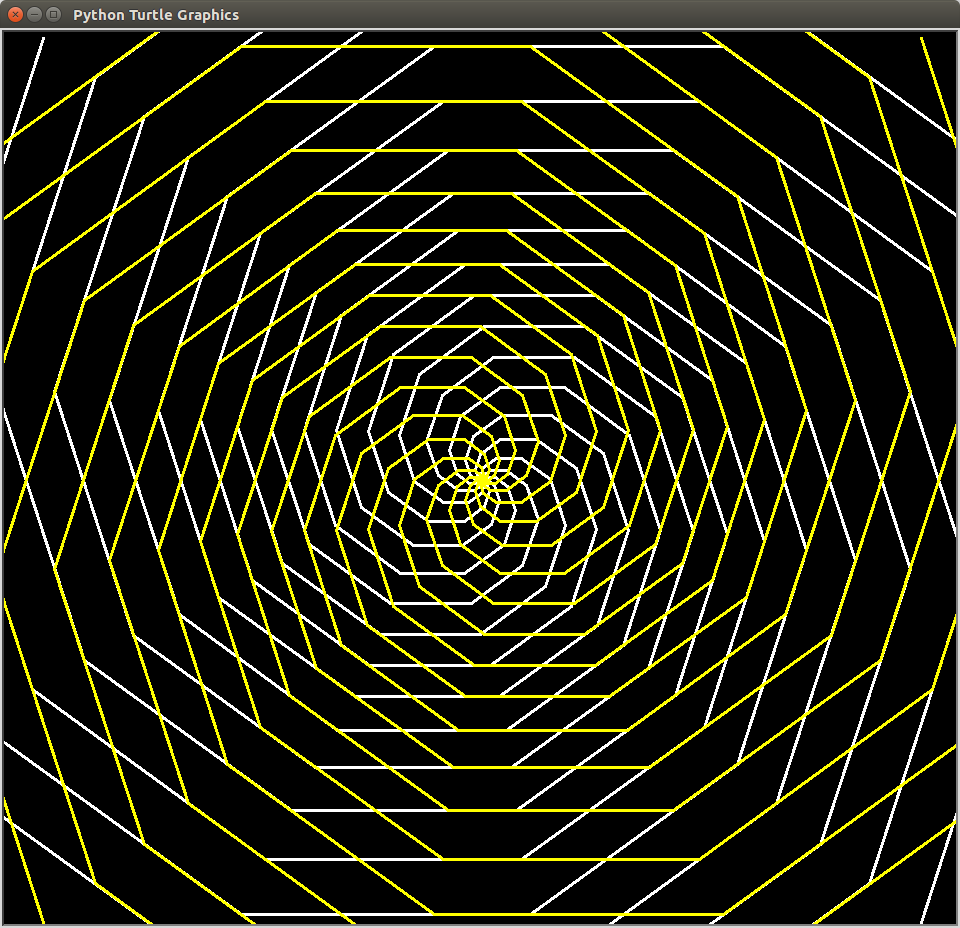
The above equations do tend to produce curves with radial symmetry, but there is another method that can be used to produce other curves, this time with rotational symmetry. For instance, a curve can be generated by moving to new point depending on the latest move. This process is then iterative.

Gravity Wave - turtle graphics
Gravity Wave turtle graphics

For instance, the next position could be determined by turning through an angle and move forward a little more than the last time. Something like this snippet of code would do that:

for i in range(1, 200):
t.forward(a)
t.pendown()

t.left(c)
a = a + 1
c = c + 10

This brings up a point of interest. If you run code like this, ensure that you don’t stop it too soon. This code causes the turtle to spin and draw in a small area for a while, and then fly off. However it quickly starts to spin again in a relatively small area before once more shooting off again. Evidently it repeats this process as it continues to move off in a particular direction.

Turtle graphics - a complex curve from a simple equation
Turtle graphics – a complex curve from a simple equation

Another use of turtle graphics is to draw graphs of functions, much like we learnt to do in school with pencil and squared paper. One such function is the cycloid function:

x = r(t – sine(t))

y = r(1 – cosine))

This function describes the motion of a wheel rolling along a level surface and can easily be translated into Python. More generally it is the equation of a radius of a circle rolling along a straight line. If a different point is picked, such a point on a radius inside the circle or a point outside the circle on the radius extended, a family of curves can be generated.

Cycloid curve - turtle graphics
Cycloid curve – turtle graphics

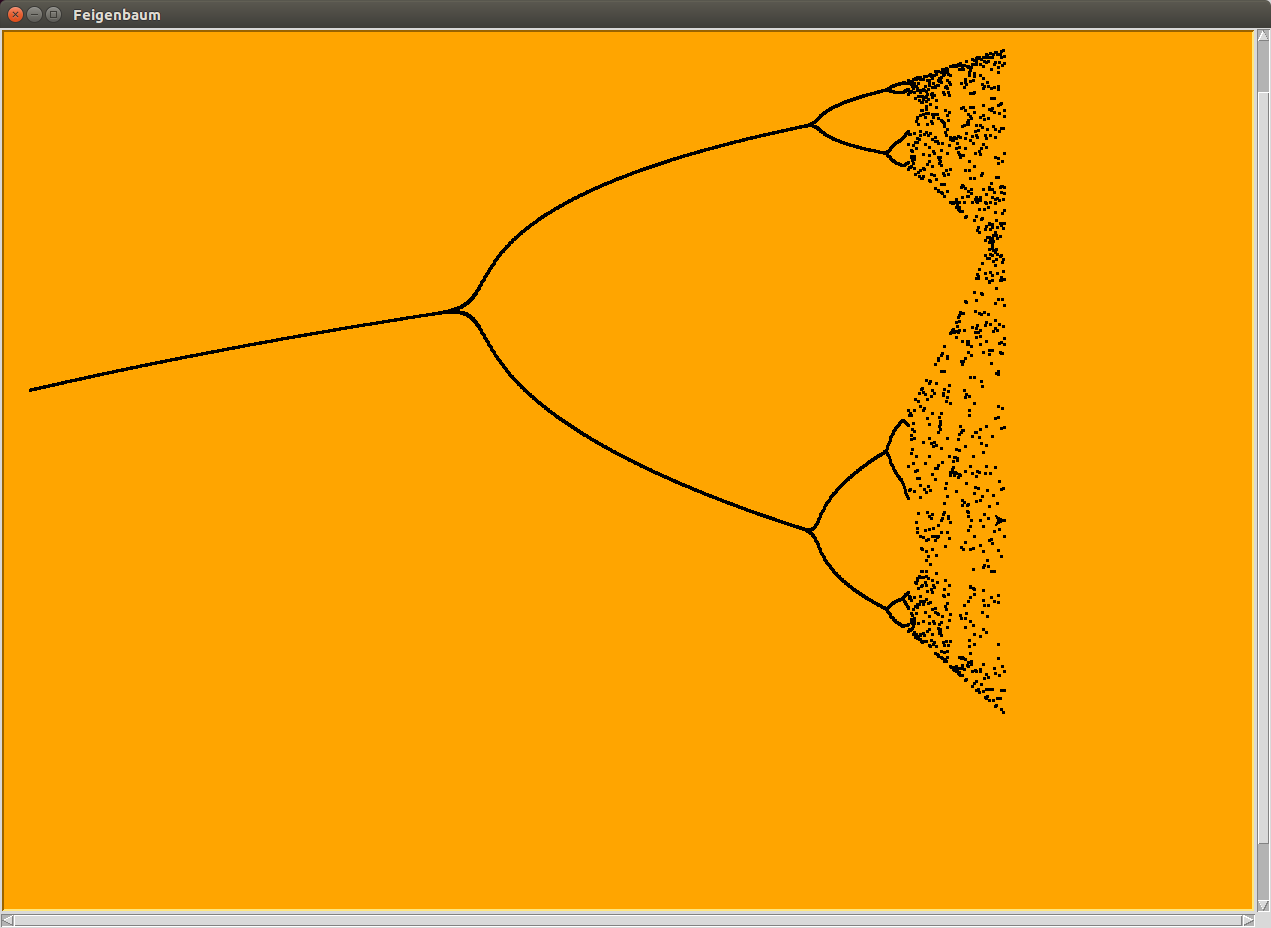
Finally, a really technical example. An equation like the following is called a dynamic equation. Each new ‘x’ is generated from the equation using the previous ‘x’. If this process is repeated many times, then depending on the value of ‘r’, the new value of ‘x’ may become ever closer to the previous value of ‘x’.

x(n+1) = rx(n)(1 – x(n))

If the value of ‘r’ is bigger than a certain value and less than another value, then ‘x’ flip-flops between two values. If the value of ‘r’ is bigger than the other value, and smaller than yet another value then ‘x’ rotates between 4 values. This doubling happens again and again in a “period doubling cascade“.

Turtle graphics - electron orbitals
Turtle graphics – electron orbitals

I’ve written a turtle program to demonstrate this. First a value for ‘r’ is chosen, then the equation is repeated applied 1,000 times, and the next 100 results are plotted, x against r. In the end result, the period doubling can easily be seen, although after a few doubling, the results become messy (which may be related to the accuracy and validity of my equations, and the various conversion between float and integer types).

Period doubling
The “fig tree” curve calculated in Python and plotted by Turtle Graphics.

Upgrading


Embed from Getty Images

I’ve just upgraded my desktop computer system. I’ve replaced the CPU, motherboard, RAM, power supply unit, and disk drive. In fact what I’ve really done is build a new computer in the existing case, keeping only my keyboard, mouse and monitor.

I’ve not had any problems, apart from the fact that the pesky little screws that hold things together seem smaller and more fiddly than I remember, but that may just be my ageing fingers.

English: Sony NEWS UNIX workstation. Left view...
English: Sony NEWS UNIX workstation. Left view with the top open. The top is held by 6 screws, 2 on the back and 2 on each side. On the left side we can see the only cooling fan. (Photo credit: Wikipedia)

Incidentally I replaced the existing hard disk drive with a solid state drive or SSD. This is neither disk shaped nor does it have any moving parts, so its name is a bit misleading.

I’d had the previous computer for several years, so why did I replace it? Well, it was getting a little slow and some things ran very slowly on it. When I did a backup it would slow almost to a crawl. Its slowness was my fault really as I was trying to run far too much stuff on it. If I merely browsed the Internet and received and sent mail, and got rid of all the other baggage that I had acquired, it would probably have sufficed.

A modest junk box
A modest junk box (Photo credit: Wikipedia)

But where’s the fun in that! Having been system administrator in the past, I see interesting things coming through, like programs that simulate the running of an Android phone, so that you can write and test them on your desktop,. Wow! Now all I need is an idea for a killer app that can make me buckets of money.

So that went on the desktop, and I tried it out and lo! It worked fine. Then I moved on to something else and the killer app never got written. That seems to be the way that it goes with me – I see something cool, install it, and get it working, but once I get a handle on how it behaves, I lose interest.

English: Wikipedia Android app
English: Wikipedia Android app (Photo credit: Wikipedia)

I have nothing but admiration for people who have an idea, who then program it up, put it out there for people to try, and then deal with the inevitable bug reports and requests for enhancements and changes. Sometimes they modify and support the programs that they write for decades. Of course if they get bored with the whole thing, they can walk away from their baby and either the program becomes “abandonware” or someone else takes up the baton.

I can program though. I’ve written and supported programs and scripts which I’ve written for my job as systems administrator, and even at home I’ve written backup scripts and programs which are useful and, for the moment, complete, but I’ve got dozens of others which I started but did not complete for some reason or other.


Embed from Getty Images

As an example, this blog uses WordPress as a platform. WordPress comes in two forms. There is the usual WordPress service, referred to as “WordPress.com” and there is “WordPress.org“.

The “dot org” version is an Open Source project with hundreds of volunteers writing code, packaging and otherwise making WordPress available to anyone wants to download it and use it on the computers that they operate and use.

Screenshot of WordPress interface (wordpress i...
Screenshot of WordPress interface (wordpress is under the GPL) (Photo credit: Wikipedia)

However, many people don’t want to do download and run it themselves, either because they don’t have that sort of access to the computers that they use, or they are not technically competent enough, so the “dot com” version of the program is provided for people who simply want to use WordPress and not maintain it.

I set up this blog on WordPress.com initially, but wondered if it would be a good idea to run the WordPress.org version instead. So I downloaded it and installed it, and bingo! A clone of WordPress.com. Which was OK, but then I was faced with the need to find somewhere visible to host it – it’s no good having a blog if people can’t see it!

Multiple racks of servers
Multiple racks of servers (Photo credit: Wikipedia)

In the end I decided to stay with WordPress.com as I didn’t need anything different from that version, and using WordPress.com avoid the hosting hassles. For a simple blog, without any esoteric bells and whistles, it is ideal. It can also be used for more complex situations, provided they don’t need changes to the core code.

Incidentally I started out with a Drupal site. I love Drupal and still have a Drupal site on my computer, which I tinker with occasionally. It’s a much more complex beast than WordPress (though WordPress is very flexible and extendable), but in the end, I don’t need the complexities at this time, so I moved to WordPress. One is not better than the other, they are just different.

drupal icon, svg version
drupal icon, svg version (Photo credit: Wikipedia)

Of course, I’ve tried many other content management or blogging tools and frameworks. A framework can be thought of as a “do it yourself” type of website building tool, a few steps up from writing HTML, and several steps below a complete content management or blogging system.

All the discarded and forgotten stuff on my computer was obviously slowing it down, but arguably more importantly, technology has moved on. The old CPU had a single core, whereas the new one has ten! Two gigabytes of memory was proving restrictive. The disks were old and slow.

English: A portion of a DECsystem-1090 showing...
English: A portion of a DECsystem-1090 showing the KL10 CPU and MH10 memory cabinets. Suomi: Osa DECsystem-1090-tietokonetta. Kuvassa koneen KL10-pääyksikkö (kolme ensimmäistä kabinettia?) ja useita MH10-muistikabinetteja. (Photo credit: Wikipedia)

So the upgrade happened and I’m very pleased with it. The CPU (currently) barely breaks into a canter. The RAM is extensive, and I’m sure there are bits that haven’t been touched! Above all the new SSD is fast and my browser opens in a snap. No doubt I’ll think of things to eventually slow it down, but for the moment it is great. All the crud is gone, but I still have it backed up. Once a sysadmin always a sysadmin – always take backups of your backups and never throw anything away!

Just About There
Just About There (Photo credit: Wikipedia)

Above all it is quiet! There is no disk noise, and the CPU fan is also quiet. I was telling my daughter how quiet it was and sure enough we couldn’t hear it running. OK, there was a bit of ambient noise from the grand-rats and the dog, but it was quiet. It wasn’t until they had gone that I discovered that it was actually switched off! But it really is that quiet.

English: It's not normally this quiet.
English: It’s not normally this quiet. (Photo credit: Wikipedia)

Updates to software

Embed from Getty Images

It’s obviously a good thing for bugs to be fixed. Software should function correctly and without exposing the user to security issues, and updates to fixes for this reason are essential.

Unfortunately this sometimes, one might say often, has a negative impact on the user. The user may know of the bug and have a workaround for it, and fixing the bug may cause the cause issues with the workaround.

Embed from Getty Images

Not to mention the fact that fixing one bug may result in the appearance of another or bring its existence to the notice of the user. No software can ever be considered to be completely bug free, in spite of the advanced tools which are available to test software.

When I was learning to program, back in the time of the dinosaurs, we were told to give our program and the specs to one of our fellow students to test. We called it “Idiot Testing”. The results were mind blowing. A tester would make assumptions, put in data that they consider valid, but which you, as the program writer had not considered, or maybe you considered it “obvious” that putting in certain types or values of data would not work.

Embed from Getty Images

Almost every time the tester would break the program somehow, which was the whole point, really. So we’d fix up our programs and give them up to be tested again. And the testers would break them again.

We were taught and quickly learned the advantage of sanitising the inputs to our programs. This meant we had to take the data as input by the tester and incorporate in our programs routines to try to ensure that the data didn’t break the program.

Embed from Getty Images

So we’d write our routines to validate the data, and we’d return an error message to the tester. We’d think that we were providing clear reasons in the messages to the tester, but the messages could still confuse the testers.

For example if the message said “The input must be between -1 and 1”, the tester might try putting in “A” or “1/4”. This usually happened when the purpose of the program was not clearly defined and described, not because of any denseness or sheer caprice on the part of the tester.

Then we’d update the programs again, taking into account what we had learned from the tester’s responses, and hopefully there would be more success with the updated program.

Embed from Getty Images

This seems to be more of an issue in mobile software, I believe, as many programs out there are written by a single person working alone, and I know that by the time I finish a program I’m heartily sick of it, and I write programs for myself as intended user. A person may upload a mobile app, with plenty of obvious bugs, and may never update it. It becomes abandonware, which may lead a general disillusion with mobile software as being buggy and never fixed.

When a developer does start to work on his program, and starts to fix the bugs, this takes time and effort. Meanwhile users may keep reporting issues with the published version. The developer has a dilemma. Does he/she drop his work on a particular bug to identify and fix the possible new bug? Or does he/she finish working on the current bug and eventually release a new version which would still contain the old bug?

Embed from Getty Images

Once the programmer starts on a new release, adding new features and improvements over the original version, bug notification and fixing acquires a new layer of complexity, one which a single developer may find impossible to handle, so he or she might abandon the software rather than take on the complexities of bug management.

Other times teams form or businesses take up the software, and bug management and fixing become formalised, but updates still need to be supplied to the users. From the user perspective, updates are more regular and fixes may be supplied in the updates if they are lucky.

Embed from Getty Images

Updates have had a bad reputation in the past. In the early days of computing operating systems (such as Windows) could become unbootable after an upgrade if the user was unlucky. This generally could be tracked down to issues in the driver software that controlled the various attached or builtin devices on the computer.

Things are now a lot better. Drivers are written to be more robust with respect to operating systems upgrades, and operating systems have become better at handling issues with hardware drivers. It is rare these days for an upgrade to render a system completely unbootable, though an upgrade can still cause issues occasionally.

Embed from Getty Images

Users have become used to preforming upgrades to systems and software, and in some cases they, by default, do not have a choice whether or not to upgrade. They do not, in most cases, know exactly what upgrades have gone on to their computers and do not known what fixes are included in these upgrades.

Software updates are often seen by users as a necessary evil. There are reasons for updates though as they may well close security loopholes in software, or they may enhance the functionality of software. Just don’t expect an early fix for that annoying bug though, as the developers will almost certainly have different priorities to you. If it isn’t in this update, maybe it wasn’t serious enough to make it. Hopefully it will be in the next update, which will be along soon!

Embed from Getty Images

Software

ModernSoftwareDevelopment

Coding is a strange process. Sometimes you start with a blank space, fill it with symbols and numbers, and eventually a program appears at the end. Other times you take your or someone else’s work and modify it, changing it, correcting it, or extending it.

The medium that you do this in can be varied. It could be as simple as a command line, a special “Integrated Development Environment” or “IDE” or it could be a fancy drag and drop within a special graphical programming application such as “Scratch“. It could even be within another application such as a spreadsheet or database program. I’ve tried all of these.


BasictoPHP - Integrated Development Environment

The thing that is common to all these programming environments is that they run inside another program – the command line version (obviously enough) requires that the command line program, which receives the key presses necessary to build the new program and interprets them, must be running, and the command line program itself runs in another program.

Which itself runs in yet another program, and so on. So, is it programs all the way down? Well, no. One is tempted to say “of course not”, but it is not immediately apparent what happens “down there”.

Hawaiian Green Sea Turtle

What happens down there is that the software merges into the hardware. At the lowest software level the programs do things like read or write data values in specific bits of hardware, and move or copy data values from one place to another. One effect of a write, move or copy might be to cause the hardware to add two numbers together.

Also, the instruction may cause the hardware to select the next instruction to be executed depending on the data being executed. It may default to the next sequential instruction, or it may execute an instruction found elsewhere.

MCS650x Instruction Set

An instruction is just a number, an entity with a specific pattern within the computer. It has a location in the hardware, and is executed by being moved to another location in the hardware. The pattern is usually “binary code” or a string of ones and zeroes.

In the hardware component called a CPU, there are several locations which are used for specific purposes. Data may be found there or it may be copied there. At certain times the data will be executed or processed. Whatever the purpose of the data, it will travel as a train of zeroes and ones though the hardware, splitting, merging and being transformed by the hardware. It may also set signals and block or release other data in the CPU.

Acorn 2MHz6502CPUA

The designers of the CPU hardware have to design this “train system” so that the correct result is achieved when an instruction is processed. Their tools are simple logic circuits which do things like merge two incoming trains of zeroes or ones or split one train into two or maybe replace all the zeroes by ones and vice versa. I think that it is fairly accurate to say that the CPU designers write a program using physical switches and wires in the hardware itself.

So we have reached the bottom and it is not programs, but logic gates, and there are many layers of programming above that to enable us to write “Hello World” on our monitor devices. It’s an elegant if complex system.

Of course we can’t program in logic gates to achieve the “Hello World” objective. We have many layers of programs to help us. But how do the various layers of programs work?

Hello World App

The designers of the CPUs hardware program the device to perform certain actions when a special code is dropped into a special location. There are only 100 to 200 special codes that a CPU recognises and they are patterns of zeroes and ones as described above.

Obviously it would be tedious and error prone to actually code those special codes (and the associated data locations, known as addresses) directly into the computer, so small programs were written in the special codes to recognise mnemonics for the codes and these were then used to write more complex programs to automatically create the strings of codes and addresses necessary to create the lowest level code.

This process is known as boot-strapping, as ever more complex programs are built, culminating in what are known as high level languages, where little or no knowledge of the hardware is required. When a new type of machine comes along, using a different type of hardware, it is even possible to write the programs at a high level on different hardware so that the software can be “ported” to the new system.

Lighthouse at Port Adelaide

The highest level of programs are the ones that actually do the work. These programs may be something like a browser which fetches data and displays it for the user, but a browser is created by a programmer using another program called a compiler. A compiler’s function is to create other programs for the end user.

However to write or modify a compiler you need another program, or maybe a suite of programs. Code is usually written in a human readable form called “source code”. An editor program is needed to read, modify and write the source code. A compiler is needed to change the human readable code to machine executable code and a linker is usually required to add all the bits of code together and make it executable.

GCC-4.0.2-screenshot

All these programs have their own source code, their compiler and linkers, and it may seen as if we have an issue with all programs requiring their own source code and so on. It seems that we have an infinite regress again. But once we have an editor, a compiler and a linker we can compile any program we like, and we don’t need to know the details of the hardware.

And what is more those programs, editor, compiler and linker, can created using an existing compiler, editor and linker on another different machine and simply transferred to the new one. In some ways every compiler, editor and linker program can trace its ancestry back to a prototype written at the dawn of the computer age.

IMGP1181 Colossus

What’s the probability?


transparent_die
Transparent die

We can do a lot with probability and statistics. If we consider the case of a tossed die, we know that it will result in a six about one time in six in the die is not biassed in any way. A die that turns up six one time in six, and the other numbers also one time in six, we call a “fair” die.

We know that at any particular throw the chance of a six coming up is one in six, but what if the last six throws have all been sixes? We might become suspicious that the die is not after all a fair one.

Dice
Dice

The probability of six sixes in a row is one in six to the power of six or one in 46656. That’s really not that improbable if the die is fair. The probability of the next throw of the die, if it is a fair one, is still one in six, and the stream of sixes does not mean that a non six is any more probable in the near future.

The “expected value” of the throw of a fair die is 3.5. This means that if you throw the die a large numbers of time, add up the shown values and divide by the number of throws, the average will be close to three and a half. The larger the number of throws the more likely the measured average will be to 3.5.

craps_table
Crap table

This leads to a paradoxical situation. Suppose that by chance the first 100 throws of a fair die average 3.3. That is, the die has shown more than the expected number of low numbers. Many gamblers erroneously think that the die is more likely to favour the higher numbers in the future, so that the average will get closer to 3.5 over a much larger number of throws. In other words, the future average will favour the higher numbers to offset the lower numbers in the past.

In fact, the “expected value” for the next 999,900 is still 3.5, and there is no favouring of the higher numbers at all. (In fact the “expected value” of the next single throw, and the next 100 throws is also 3.5).

pile_of_cash
Pile of cash

If, as is likely, the average for the 999,900 throws is pretty close to 3.5, the average for the 1,000,000 throws is going to be almost indistinguishable from the average for 999,900. The 999,900 throws don’t compensate for the variation in the first 100 throws – they overwhelm them. A fair die, and the Universe, have no memory of the previous throws.

But hang on a minute. The Universe appears to be deterministic. I believe that it is deterministic, but I’ve argued that elsewhere. How does that square with all the stuff about chance and probability?

orbital
Orbital

Given the shape of the die, its trajectory from the hand to the table, given all the extra little factors like any local draughts, variations in temperature, gravity, viscosity of the air and so on, it is theoretically possible, if we knew all the affecting factors, that, given enough computing power, we could presumably calculate what the die would show on each throw.

It’s much easier of course to toss the die and read the value from the top of the cube, but that doesn’t change anything. If we knew all the details we could theoretically calculate the die value without actually throwing it.

abacus
abacus

The difficulty is that we cannot know all the minute details of each throw. Maybe the throwers hand is slightly wetter than the time before because he/she has wagered more than he/she ought to on the fall of the die.

There are a myriad of small factors which go into a throw and only six possible outcomes. With a fair die and a fair throw, the small factors average out over a large number of throws. We can’t even be sure what factors affect the outcome – for instance, if the die is held with the six on top on each throw, is this likely to affect the result? Probably not.

Einstein's equation
E = mc2

So while we can argue that when the die is thrown that deterministic laws result in the number that comes up top on the die, we always rely on probability and statistics to inform us of the result of throwing the die multiple times.

In spite the seemingly random string of numbers from one to six that throwing the die produces, there appears to be no randomness in the cause of the string of results from throwing the die.

popcorn
Popcorn

The apparent randomness appears to be the result of variations in the starting conditions, such as how the die is held for throwing and how it hits the table and even the elastic properties of the die and the table.

Of course there may be some effects from the quantum level of the Universe. In the macro world the die shows only one number at a time. In the quantum world a quantum die may show 99% one, 0.8% two, 0.11% three… etc all adding up to 100%. We look at the die in the macro world and see a one, or a two, or a three… but the result is not predictable from the initial conditions.

Random
Random

Over a large number of trials, however, it is very likely that these quantum effects cancel out at the macro level. In maybe one in a very large number of trials the outcome is not the most likely outcome, and this or similar probabilities apply to all the numbers on the die. The effect is for the quantum effects to be averaged out. (Caveat: I’m not quantum expert, and the above argument may be invalid.)

In other cases, however, where the quantum effects do not cancel out, then the results will be unpredictable. One possibility is the case of weather prediction. Weather prediction is a notoriously difficult problem, weather forecasters are often castigated if they get it wrong.

lightning
Lightning

So is weather prediction inherently impossible because of such quantum level unpredictability? It’s actually hard to gauge. Certainly weather prediction has improved over the years, so that if you are told by the weather man to pack a raincoat, then it is advisable to do so.

However, now and then, forecasters get it dramatically wrong. But I suspect that that is more to do with limited understanding of the weather systems than any quantum unpredictability.

Flooded
Flooded


Computer to Brain, Brain to Computer


Embed from Getty Images

In the dawn of computing computers were essentially rooms full of racks and racks of circuits connected by mazes of cables. The circuits were formed out of electronic valves, relays, solenoids and other electronic and magnetic components, with not a single transistor to be seen, as semiconductors had not then been invented.

To reprogram such computers one often needed a soldering iron and an intensive knowledge of every part of the computer and how the parts interacted. From all accounts such machines were fickle, sometimes working sometimes not.

English: "U.S. Army Photo", from M. ...
English: “U.S. Army Photo”, from M. Weik, “The ENIAC Story” A technician changes a tube. Caption reads “Replacing a bad tube meant checking among ENIAC’s 19,000 possibilities.” Center: Possibly John Holberton (Photo credit: Wikipedia)

Since they were not housed in sterile environments or encased in a metal or plastic shell, foreign bodies could and did find their way into them and cause them to fail. Hence the concept of the computer bug. Computer pioneer Grace Hopper reported a real bug (actually a moth) in a computer and it made a great joke, but from the context of the report the term already existed.


Embed from Getty Images

As we know computer technology rapidly improved, and computers rapidly shrank, became more reliable, and bugs mostly retreated to the software. I don’t know what the architecture of the early room fillers was, but the architecture of most computers these days, even tablets and phones, is based on a single architecture.

This architecture is based on buses, and there is often only one. A bus is like a data highway, and data is placed on this highway and read off it by various other computer circuits such as the CPU (of which more later). To ensure that data is placed on the bus when safe, every circuit in the computer references a single system clock.

English: A Chennai MTC Volvo bus in front of t...
English: A Chennai MTC Volvo bus in front of the Royapettah clock tower, Chennai, India. (Photo credit: Wikipedia)

The bus acts much like the pass in a restaurant. Orders are placed on it, and data is also placed on it, much like orders are placed through the pass and meals come the other way in a restaurant. Unlike the restaurant’s pass however, there is no clear distinction between orders and data and the bus doesn’t have two sides corresponding to the kitchen and the front of house in a restaurant.

Attached to the bus are the other computer components. As a minimum, there is a CPU, and there is memory. The CPU is the bit that performs the calculations, or the data moves, or whatever. It is important to realise that the CPU itself has no memory of what has been done, and what must be done in the future. It doesn’t know what data is to be worked on either.

The ZX81 PCB. The circuits are (from left to r...
The ZX81 PCB. The circuits are (from left to right) ULA, Z80 CPU, 8 Kb ROM and two memory curcuits making up 1 Kb RAM. (Photo credit: Wikipedia)

All that stuff is held in the memory, data and program. Memory is mostly changeable, and can contain data and program. There is no distinction in memory between the two.

The CPU looks on the bus for what is to be done next. Suppose the instruction is to load data from the bus to a register. A register is a temporary storage area in the CPU. The CPU does this and then looks for the next instruction which might be to load more data from the bus to another register, and then it might get an instruction to add the two registers and place the result in a third register. Finally it gets told to place the results from the third register onto the bus.

English: Simplified diagram of a computer syst...
English: Simplified diagram of a computer system implemented with a single system bus. This modular organization was popular in the 1970s and 1980s. (Photo credit: Wikipedia)

I was not entirely correct when I said that there was only one bus in a computer. Other chips have interfaces on the main bus, but have interfaces on other buses too. An example would be the video chip, which has to interface to both the main bus and the display unit. Another example is the keyboard. A computer is not much use without input and output!

The architecture that I’ve described is incorporated in almost all devices that have some “intelligence”. Your washing machine almost certainly has it, and as I said above so do your tablets and phones. Your intelligent TV probably does, and even your stove/range may do. These days we are surrounded by this technology.

The microcontroller on the right of this USB f...
The microcontroller on the right of this USB flash drive is controlled with embedded firmware. (Photo credit: Wikipedia)

The above is pretty much accurate, though I may have glossed and elided some facts. Although the technology has advanced tremendously over the years, the underlying architecture is still based around the bus concept, with a single clock synchronizing operations.

Within the computer chips themselves, the clock is of prime importance as it ensures that data is in the right place at the right time. Internally a computer chip is a bit like a train set, in that strings of digits flow through the chip, passing through gates which merge and split the bits of the train to perform the calculations. All possible tracks within the chip have be traversable within a clock cycle.

English: Chips & Technologies Super 386
English: Chips & Technologies Super 386 (Photo credit: Wikipedia)

Clockless chips may some day address the on-chip restrictions, though the article I cite was from 2001. I’m more interested in the off-chip restrictions, the ones that spring from the necessity to synchronise the use of the bus. This pretty much defines how computers work and limit their speed.

One possibility is to ditch the bus concept and replace it with a network concept little bits of computing power could be distributed throughout the computer and could either be signalled with the data and the instructions to process the data, or maybe the computing could be distributed to many computational units and the result could then be assessed and the majority taken as the “right” answer. The instructions could be dispensed with if the computational unit only does one task.

Network Computing Devices NCD-88k X terminal, ...
Network Computing Devices NCD-88k X terminal, back ports. (Photo credit: Wikipedia)

The computational units themselves could be ephemeral too, being formed and unformed as required. This would lead to the “program” and “computation” being distributed across the device as well as the data. Data would be ephemeral too, fading away over time, being reinforced if necessary by reading and writing, much like early computer memory was refresh on each cycle of the clock.

What would such a computer look like? Well, I’d imagine that it would look something like the mass of grey matter between your ears. Data would exist in the device as an echo, much like our memories do, and processing would be distributed through the device much like our brains seem to work. Like the brain it is likely that such a computing device would be grown, and likely some structures would be mostly dedicated to certain tasks, as in the brain.


http://www.gettyimages.com/detail/126162749

One big advantage that I see for such “devices” is that it should be very easy to interface them to the brain, as they would work on similar principles. It does mean though that we would be unlikely to be able to download one of these devices to a conventional computer, just as the contents of a brain could never be downloaded to a conventional computer.

On the other hand, the contents of a brain could conceivable be downloaded to a device like I have tried to describe.


http://www.gettyimages.com/detail/492585270

Is the Brain a Computer?

English: a human brain in a jar
English: a human brain in a jar (Photo credit: Wikipedia)

I’ve just read an interesting article by Robert Epstein which tries to debunk the idea that the brain is a computer. His main thrust seems to be that the idea that the brain is a computer is just a metaphor, which it is. Metaphors however are extremely useful devices that use similarities between different systems to perhaps understand the least understood of the two systems.

Epstein points out that we have used several metaphors to try to understand the mind and the brain, depending on the current state of human knowledge (such as the hydraulic metaphor). This is true, but each metaphor is more accurate than the last. The computer model may well be the most accurate yet.

Cork in a hydraulic ram
Cork in a hydraulic ram (Photo credit: Wikipedia)

The computer model may well be all that we need to use to explain the operation of the brain and mind with very high accuracy. Brain and mind research may eventually inform the computer or information technology.

It is evident that Epstein bases his exposition on a partially understood model of computing – for instance it appears that he thinks that data is stored in a more or less permanent fashion in a computer. He says:

The idea, advanced by several scientists, that specific memories are somehow stored in individual neurons is preposterous; if anything, that assertion just pushes the problem of memory to an even more challenging level: how and where, after all, is the memory stored in the cell?

This describes one particular method of storing data only. It sort of equates with the way that data is stored on a hard disk. On a disk, a magnetic bit of the disk is flipped into a particular configuration which is permanent. However, in the memory of a computer, the RAM, the data is not permanent and will disappear when the computer is switched off. In fact the data has to be refreshed on every cycle of the computer’s timer. RAM is therefore called volatile memory.

English: Several PATA hard disk drives.
English: Several PATA hard disk drives. (Photo credit: Wikipedia)

In the early days of computing, data was stored in “delay line memory“. This is a type of memory which needs to be refreshed to preserve information contained in it. Essentially data is fed in and read out of a pipeline simultaneously, the read out being fed back to input again to complete the cycle and maintain the memory.

I expect that something similar may be happening in the brain when remembering something. It does mean that a memory may well be distributed throughout the brain at any one time. There is evidence that memory fades over time, and this could be related to an imperfect refresh process.

Schematic diagram of a delay locked loop (DLL)
Schematic diagram of a delay locked loop (DLL) (Photo credit: Wikipedia)

Epstein also has issues with the imperfect recall that we have of real life objects (and presumably events). He cites the recall of a dollar bill as an example. The version of the bill that people drew from memory was very simplified as compared to the version that they merely copied.

All that this really demonstrates is that when we remember things a lot of the information about the object is not stored and is lost. Similarly, when an image of the dollar bill is stored in a computer, information is lost. When it is restored to a computer screen it is not exactly the same as thing that is imaged. It is not the same as the image as stored in the computer.

Newfoundland 2 dollar bill
Newfoundland 2 dollar bill (Photo credit: Wikipedia)

It’s worth noting the image file in a computer is not the same as the real thing that it is an image of, as it is just a digitisation of the real thing as captured by the camera that created the image.

The image on the screen is not the same as either the original or the image in the computer, but the same is true of the image that the mind sees. It is digitised by the eye’s rods and cones and converted to an image in the brain.

English: Stylized idea of the communication be...
English: Stylized idea of the communication between the eye and the brain. (Photo credit: Wikipedia)

This digitised copy is what is recalled to the mind’s eye when we remember of recall it. The remembered copy of the original is therefore an interpretation of a digitised version of the original and therefore has lost information.

Just as the memory in our minds is imperfect, so is the image in the computer. Firstly the image in the computer is digital. The original object is continuous. Secondly, the resolution of the computer image has a certain resolution, say 1024 x 768, and some details in the original object will inevitably be lost. More details are lost with a lower resolution.

Computer monitor screen image simulated
Computer monitor screen image simulated (Photo credit: Wikipedia)

In addition the resolution of the image stored in the computer may not match the capabilities of the screen on which it is displayed and may need to be interpolated which produces another error. In the example of the dollar bill, the “resolution” in the mind is remarkably small and the “interpolation” onto the whiteboard is very imperfect.

Epstein also assumes a particular architecture of a computer which may be superseded quite soon in the future. In particular in a computer there is one timing circuit, a clock, that all other parts of the computer rely on. It is so important that the speed of a computer is related to the speed of this clock.

Clock signal + legend
Clock signal + legend (Photo credit: Wikipedia)

It may be that the brain may operate more like a network, where each part of the network keeps its own time and synchronisation is performed by a message based scheme. Or the parts of the brain may cooperate by some means that we don’t currently understand. I’m sure that the parts of the brain do cooperate and that we will eventually discover how it does it.

Epstein points out that babies appear to come with built in abilities to do such things as recognise faces, to have certain reflexes and so on. He doesn’t appear to know that computers also have built in certain basic abilities without which they would be useless hunks of silicon and metal.

An American Megatrends BIOS registering the “I...
An American Megatrends BIOS registering the “Intel CPU uCode Error” while doing POST, most likely a problem with the POST. (Photo credit: Wikipedia)

When you switch on a computer all it can do is read a disk and write data to RAM memory. That is all. When it has done this is gives control to program in RAM which, as a second stage, loads more information from the disk.

It may at this stage seek more information from the world around it by writing to the screen using a program loaded in the second stage and reading input from the keyboard or mouse, again using a program loaded in the second stage. Finally it gives control to the user via the programs loaded in the second stage. This process is called “bootstrapping” and relies on the simple hard coded abilities of the computer.

English: grub boot menu Nederlands: grub boot menu
English: grub boot menu Nederlands: grub boot menu (Photo credit: Wikipedia)

But humans learn and computers don’t. Isn’t that right? No, not exactly. A human brain learns by changing itself depending on what happens in the world outside itself. So do computers!

Say we have a bug in a computer program. This information is fed to the outside world and eventually the bug gets fixed and is manually or automatically downloaded and installed and the computer “learns” to avoid the bug.

Learning Organism
Learning Organism (Photo credit: Wikipedia)

It may be possible in the future for malfunction computer programs to update themselves automatically if made aware of the issue by the user just as a baby learns that poking Mum in the eye is an error, as Mum says “Ouch!” and backs off a little.

All in all, I believe that the computer analogy is a very good one and there is no good reason to toss it aside, especially if, as in Epstein’s article, there appears to be no concrete suggestion for a replacement for it. On the contrary, as knowledge of the brain grows, I will expect us to find more and more ways in which the brain resembles a computer and that possibly as a result, computers will become more and more like brains.

Brain 1
Brain 1 (Photo credit: Wikipedia)